
A Smart Job Alert System with N8N and AI
My job search runs on autopilot. Every hour, several workflows scan my email and search the web for new assignments, evaluate each one against my profile using Claude AI, and email me only the ones worth my attention. Here’s how I built this, using N8N.
What is N8N?
N8N is an open-source workflow automation platform – think of it as a visual tool for connecting services, APIs, and logic together without writing a full application. You build flows by dragging and dropping nodes onto a canvas: a trigger here, an API call there, some logic in between, and an output at the end.
What sets N8N apart from similar tools is that you can self-host it, and it gives you full control over what happens inside each step – including writing custom JavaScript when the built-in nodes aren’t enough. For someone with a technical background, it hits a sweet spot: low-code where you want it, full code where you need it.
In my case, I run it self-hosted via Docker. That means my flows run on my own infrastructure, my data stays local, and I’m not dependent on usage limits or subscription tiers.
The idea: let AI do the pre-selection
The concept is simple. Multiple sources publish freelance job listings. I want to be notified – but only for the ones that actually match my profile. Not every “QA Engineer” vacancy is relevant. Rate too low? Wrong location? Legacy tooling I don’t work with? Those need to be filtered out automatically.
The solution: a pipeline that collects job listings, feeds them to Claude AI for evaluation, and sends me a clean HTML email with only the relevant opportunities.
The workflows
As two main examples, I’ll walk you through the workflows I built for Freelance.nl and LinkedIn.
Freelance.nl
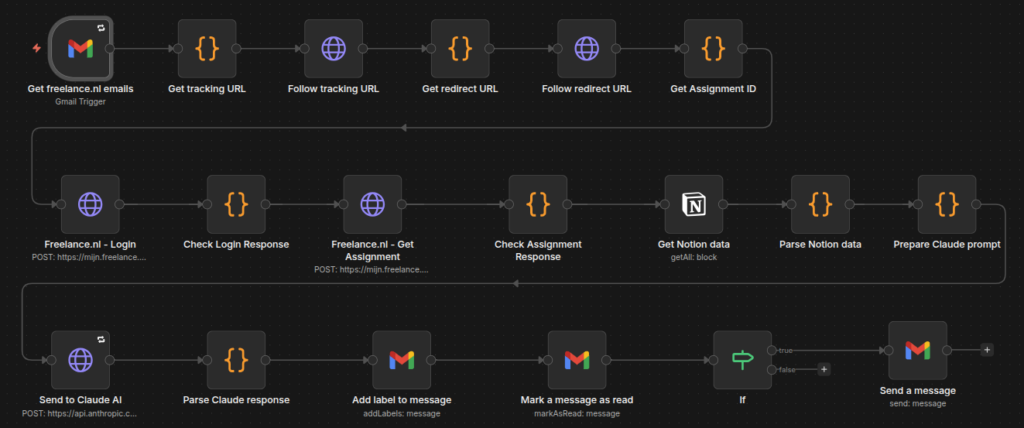
The Freelance.nl flow runs on a schedule: once per hour, N8N scans my Gmail inbox for new job alert emails from Freelance.nl. When it finds one, it extracts the job URLs and fires off a GraphQL API call to retrieve the full job details. The flow handles authentication automatically – including the login flow to obtain the required Bearer token. Claude then evaluates each listing against my profile and rates it.
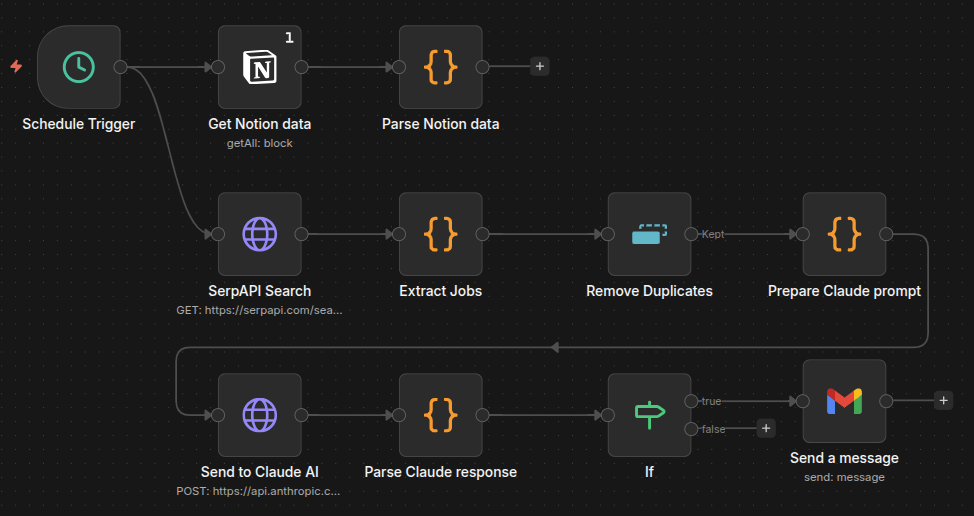
LinkedIn doesn’t offer a proper public API for job listings – so I use SerpAPI to search Google for LinkedIn results. The results are processed in parallel branches, evaluated by Claude, and for each relevant listing I receive a separate email.
Besides these two, I currently have several more flows running in parallel, each tapping into a different job source. The architecture scales quite naturally: add a new source, link it to the same shared configuration, change some specific things and done.
Notion as the single source of truth
Early on, I ran into a maintenance problem: every flow had its own hardcoded prompt, its own version of my CV, its own evaluation criteria. Changing something meant updating it everywhere. I was looking for a way to share this common data. I found the solution in Notion.
I created a single Notion page called “Job Alert Data” that holds my CV, profile, matching criteria, and output instructions. N8N connects to Notion seamlessly and every flow can read all data from that page at runtime. The result: one update in Notion and all my flows immediately use the new data.

Claude as the evaluation engine
The heart of the system is the AI evaluation step. For each job listing, Claude receives the full job description, my CV, and a clear set of instructions: what matters, what’s a dealbreaker, how to score, and how to format the output.
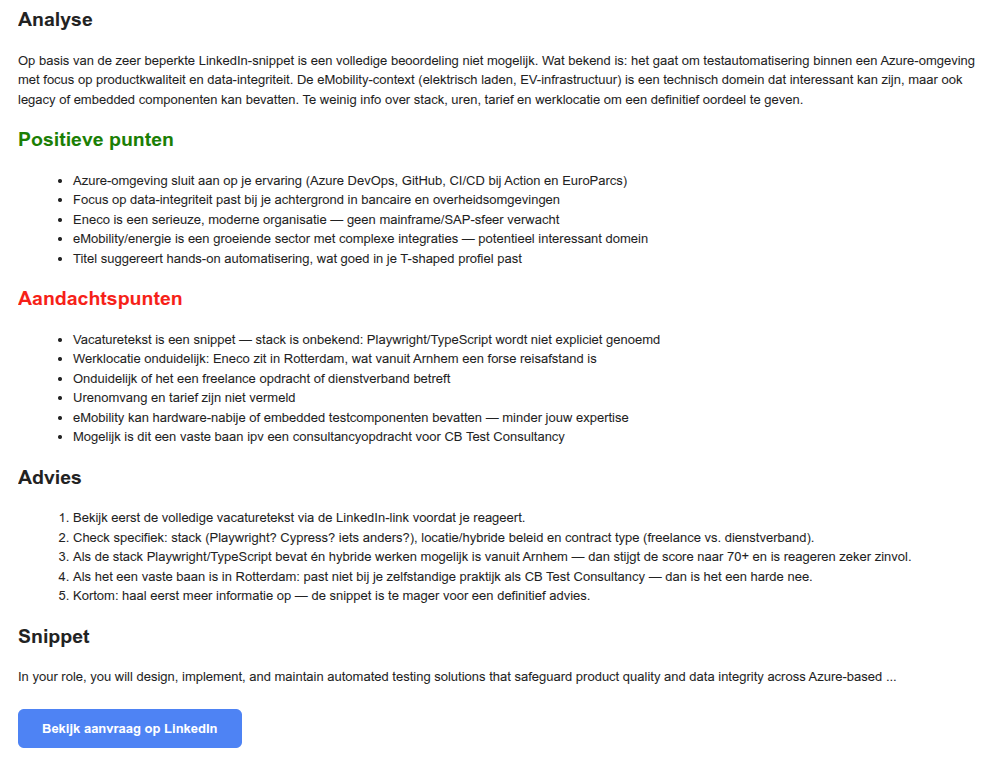
The result is a structured assessment: a match score, a short explanation, and a clear recommendation – formatted as HTML, ready for email delivery.
What makes this work is precision in the prompt. Claude is not just asked “is this a good match?” It gets specific criteria: minimum hourly rate, preferred location, required tech stack, and the instruction to be lenient – only reject when there’s a fundamental mismatch.
The output is not just a yes or no. It’s a reasoned recommendation I can act on: see the screenshot below. And only when the advice is Yes or Doubt, I actually receive an email. No means no email – it gets silently ignored.

Some technical pitfalls
No project like this goes smoothly from start to finish. Here’s what caught me off guard.
GraphQL returns HTTP 200 on errors
The Freelance.nl integration uses a GraphQL API. GraphQL is sneaky: even when something goes wrong, it returns HTTP status 200. N8N’s error handling doesn’t catch this by default. The fix: a custom Code node that checks the response body and throws an exception manually when an error is present.
Gmail strips CSS
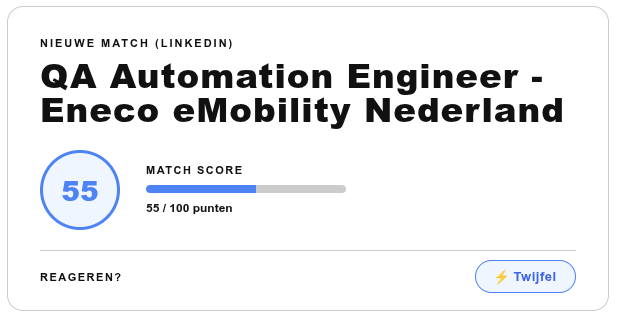
I want every email sent by N8N to include a custom HTML header card that shows the job title, match score, and the Yes/No/Doubt recommendation at a glance. This card should of course look clean and styled. Unfortunately, Gmail didn’t cooperate here: it stripped the <style> blocks entirely. Instead, everything had to be inline CSS, and the layout needed to be table-based to render correctly. It took some tweaking, but I finally managed to construct a nice header card!
JSON escaping in Claude API call
To call the Claude API from N8N, I use an HTTP Request node with a JSON body containing the prompt. This prompt is a combination of data from Notion – my CV, profile and matching criteria – and the job listing text that was just retrieved. Both can contain newlines and quotes, which break the JSON structure and cause the request to fail. The fix: use a Code node to pre-escape the string with JSON.stringify(prompt).slice(1, -1). This escapes all special characters, while stripping the outer quotes that JSON.stringify adds. The result is a safely escaped string you can insert directly into your JSON body.
Multi-item processing in LinkedIn flow
In most flows – like the ones that process incoming emails – there is only one item at a time, so using $input.first() in a Code node works perfectly fine. The LinkedIn flow, however, is different: SerpAPI returns multiple job listings in one go. Those are passed through the flow as separate items, and $input.first() silently ignores everything except the first one – no error, no warning. This made me miss a lot of LinkedIn evaluations, initially. The fix: use $input.all().map() to iterate over all items. Small detail, but without it most of my LinkedIn results would have gone completely unnoticed.
A finishing touch
One thing I added early on: after N8N processes a freelance.nl alert email, it automatically labels it as “processed by N8N” and marks it as read in Gmail. Small detail, but it keeps my inbox clean and makes it immediately clear what’s already been handled.
What’s next
The system works, but there’s always room to grow. A few things on my list:
- Real-time email triggering: replace the hourly polling with an IMAP IDLE connection, so N8N reacts the moment a new job alert lands in my inbox instead of waiting up to an hour
- Full LinkedIn job descriptions: right now I work with snippets from SerpAPI; fetching the complete vacancy text would give Claude significantly better context for evaluation
- Multi-user support: the Notion-based architecture makes it relatively straightforward to open this up for other freelancers, each with their own profile and preferences
- More sources: additional flows for other job alert emails that land in my inbox, plus flows that proactively monitor job boards on a schedule and pull in relevant listings directly, without waiting for an email notification
The bottom line
Automating your job search with N8N and AI looked like a complex thing for me at first glance. But eventually it turned out to be a very doable project. It was a weekend of experimentation, a few frustrating debugging sessions, resulting in a system that runs quietly in the background – filtering, evaluating, and notifying you only when something is worth your attention. A huge time saver!
So if you’re still manually scanning job boards every day: stop. Check out N8N, build your system and let it work!